Actions
Attach MCP servers to a project so the widget can look up a visitor's own data and act for them, with every tool switched between off, allowed and needs-confirmation.
An answer from the documentation covers "how do I cancel an order". It does not cover "where is my order". Actions close that gap: a project attaches one or more MCP servers, the tools those servers expose are discovered, and during a conversation the model may call the ones you allowed. A result is cited like a page, and every call is recorded.
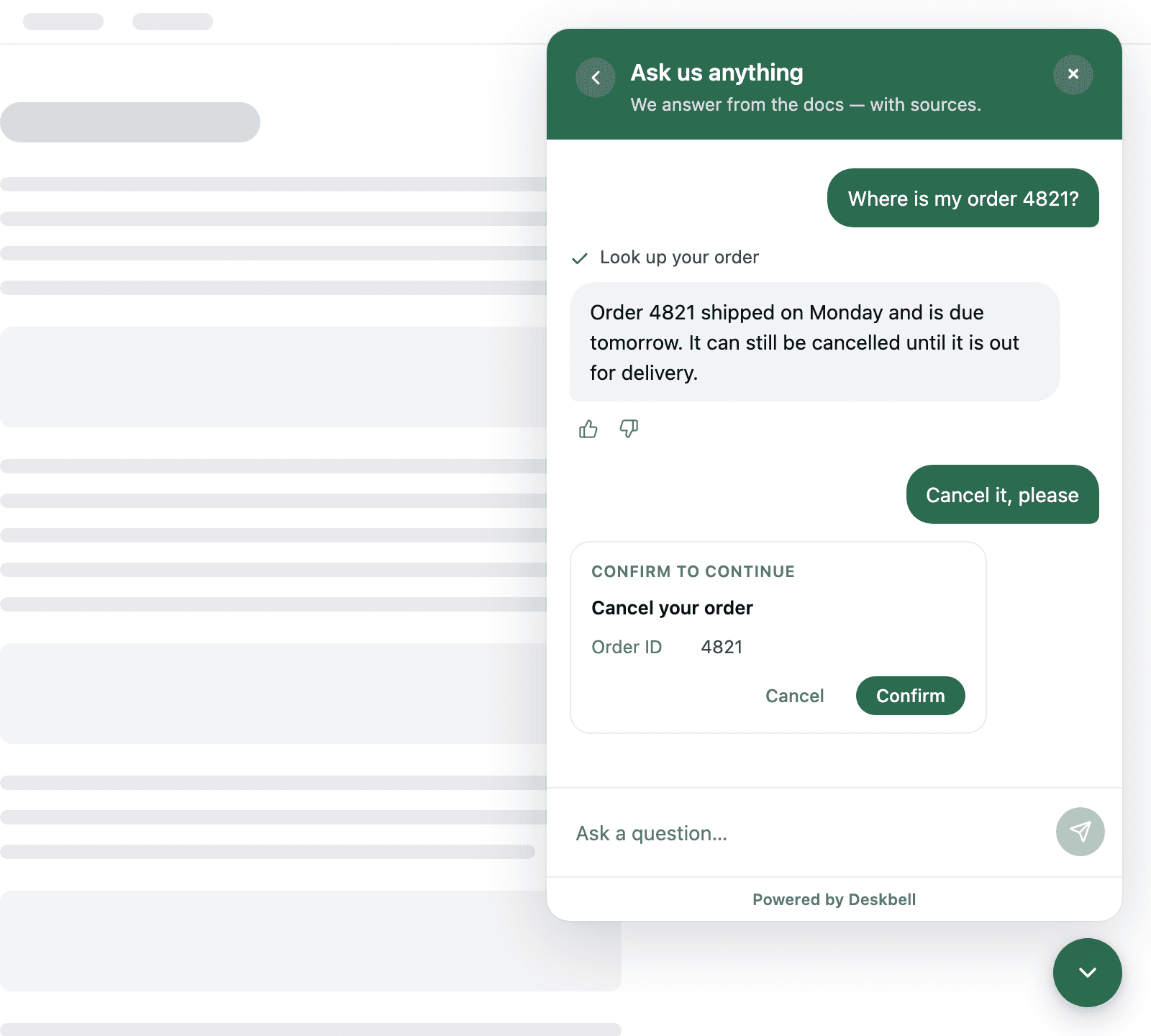
Nothing runs by default. A newly discovered tool is off until an admin sets it to Allowed (runs on its own) or Needs confirmation (the visitor sees a card naming the call and decides). Deskbell suggests Allowed only for tools the server itself marks read-only; anything else is suggested as Needs confirmation.
How a turn runs
- The visitor asks. Retrieval runs as usual and the model receives the matching content and the list of allowed tools.
- If the model calls a tool, the widget shows a step line above the answer (Look up your order…, then a check mark). The result is handed back to the model as material — never as instructions — and the answer continues.
- If the tool needs confirmation, the turn pauses. The widget shows a card naming the tool and listing its arguments; the visitor confirms or cancels; the answer resumes in a new bubble.
- The model cites the tool results it relied on the way it cites pages; the widget shows that as the step line rather than as a source.
A turn is bounded: four model steps by default, thirty seconds per call, and eight thousand characters of a result shown to the model (environment variables).
What the visitor sees
- A step line per call above the answer: the tool's label (as the operator wrote it) with a spinner while it runs, a check mark when it finished, Couldn't complete when it failed.
- For a confirmation, a card with the tool's label, the arguments one per line, and Cancel / Confirm. Once answered it becomes a step line on the same message; it expires after ten minutes.
- Nothing under Sources: the step line is the record that live data was used.
Everything a tool returns may be shown to the visitor. Attach a server the way you would give a support agent access to it.
What you see
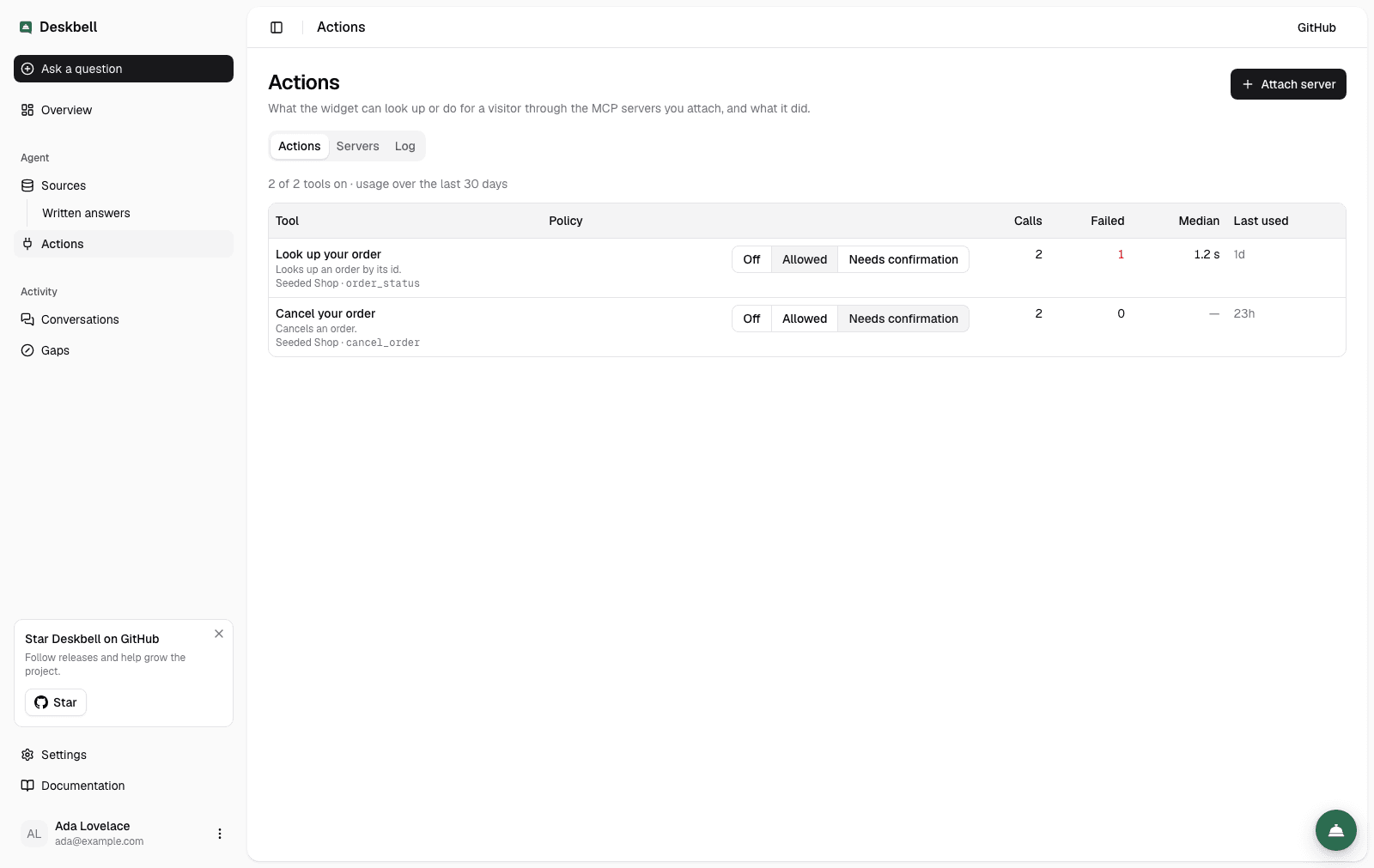
- Actions: every tool across your servers with what the visitor sees it called, what the model is told, its policy, and its last thirty days — calls, failures, median duration. Each tool has a page with its recent calls; the Servers tab holds the connections; the Log tab holds every call.
- Conversations: each answer lists the calls it made — tool, outcome, duration — and a card's verdict.
- Actions › Log: the log of every call across conversations, with its arguments, its result, who it ran for and how it ended; filter it, open a record, download it as CSV.
Where to go next
- MCP servers — attaching a server, credentials, tool policies.
- Confirmation — the pause-and-resume flow and its limits.
- Actions log — every call, filtered, in full, as CSV.
- Visitor identity — how a server learns who is asking: a signed token, or the visitor's own.
- FAQ
FAQ
Answers to the questions that come up when adding sources, from a crawl that stops early to how a written answer is ranked against the page that contradicts it.
MCP servers
Attach a remote MCP server over Streamable HTTP or SSE, give it a credential, refresh its tools and set each tool to off, allowed or needs-confirmation.