Notifications
Send a Slack message or a signed webhook when a visitor marks an answer down, with the question, the reason, the host context and a one-sentence summary.
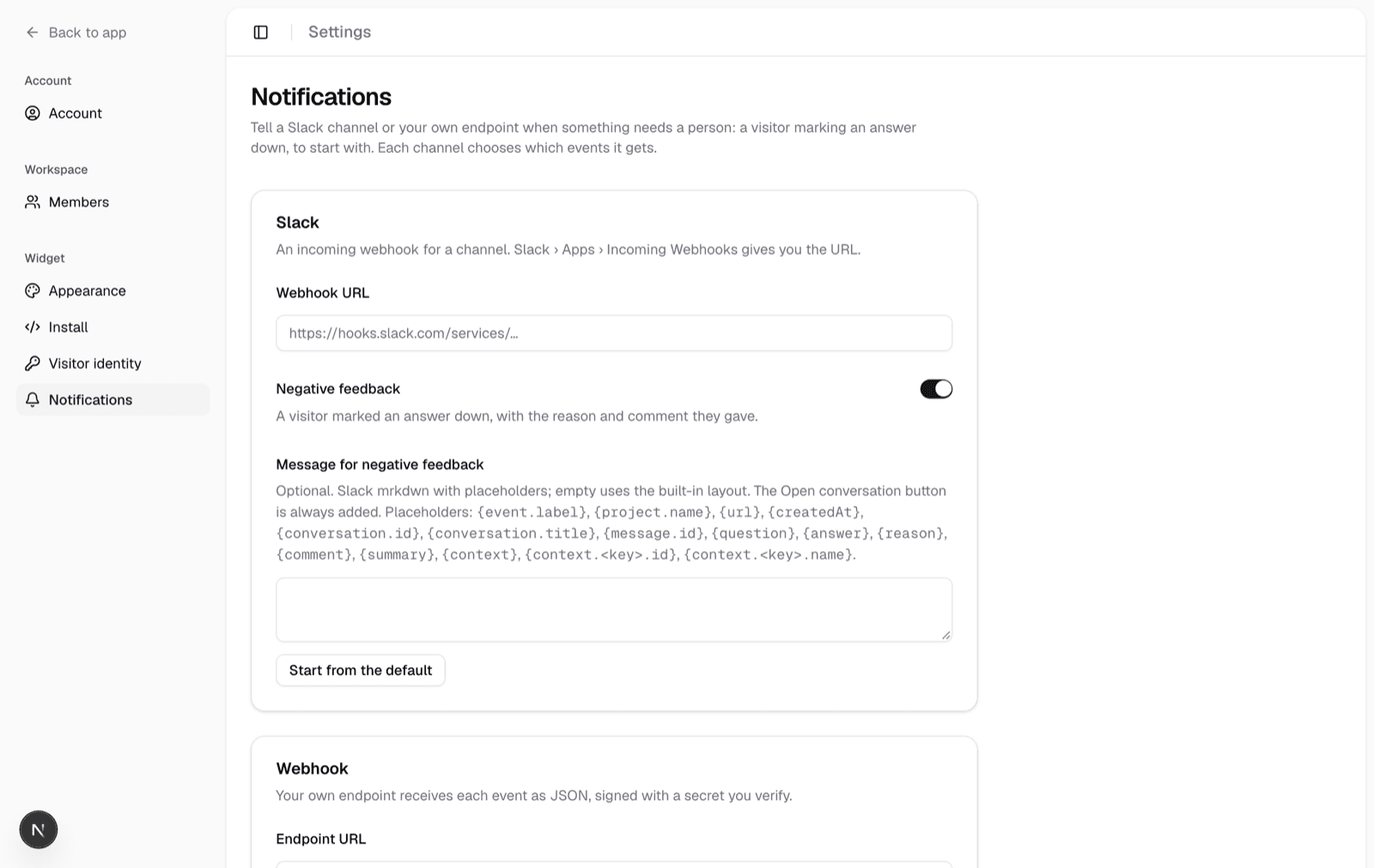
A visitor marking an answer down is the clearest signal your content has a problem, and it should reach a person without anyone watching the dashboard. Under Settings › Notifications a project names where events go: a Slack channel through an incoming webhook, your own endpoint through a signed JSON webhook, or both. Each channel chooses which events it receives.
Events
| Event | When | What it carries |
|---|---|---|
feedback.negative | A visitor gives an answer a thumbs-down | The question and answer, the reason and comment, the conversation's context, a one-sentence summary, and a link to the conversation |
The list grows by adding to it; nothing about a configured channel changes when a new event appears, except that its switch shows up in the settings.
Slack
Create an incoming webhook in Slack (Apps › Incoming Webhooks, pick the channel) and paste its URL. The message has a header naming the event and the project, the question as a quote, the reason and comment, one field per context key with its name and id, the summary, an Open conversation button and a footer with the message id and time. Push notifications carry a one-line version.
The URL lets anyone who has it post to that channel, so the page shows it masked once saved, only admins can change it, and it is never sent back to a browser.
Your own message
Each event has an optional Message box on the Slack card. Leave it empty for the layout above, or write the message yourself in Slack's mrkdwn with placeholders; Start from the default fills the box with a text version of the built-in layout to edit. A custom message is sent as one section, and the Open conversation button is always appended so the link survives any edit. Placeholders are substituted with the visitor's text escaped, so a comment cannot inject Slack markup; a placeholder this conversation has no value for (a context key it does not carry) becomes empty.
| Placeholder | Value |
|---|---|
{event.label} | "Negative feedback" |
{project.name} | The project's name |
{question}, {answer} | The visitor's question and the answer they marked down |
{reason}, {comment} | The reason's label and the free-text comment |
{summary} | The one-sentence summary |
{context} | Every context key on its own line, key: name (id) |
{context.<key>.id}, {context.<key>.name} | One context value, e.g. {context.site.name} |
{url} | The conversation link; <{url}|Open> makes it a link in text |
{conversation.id}, {conversation.title}, {message.id}, {createdAt} | Identifiers and the time |
Unknown placeholders are refused when you save.
Webhook
Your endpoint receives a POST with the event as JSON:
{
  "id": "ntf_5f1c…",
  "type": "feedback.negative",
  "version": 1,
  "createdAt": "2026-09-18T10:00:00.000Z",
  "project": { "id": "proj_…", "name": "Docs" },
  "url": "https://deskbell.example.com/conversations/conv_…",
  "data": {
    "conversation": {
      "id": "conv_…",
      "title": "Exporting a feed",
      "context": { "site": { "id": "42", "name": "Shop" } }
    },
    "message": {
      "id": "msg_…",
      "createdAt": "2026-09-18T09:59:12.000Z",
      "question": "How do I export a feed?",
      "answer": "Open the menu and…"
    },
    "feedback": { "reason": "incorrect", "reasonLabel": "Inaccurate", "comment": "wrong menu" },
    "summary": { "text": "The answer named a menu that no longer exists.", "source": "model" }
  }
}
id is the delivery id, the same on every attempt for one event; treat it
as an idempotency key, because a delivery that times out is retried. version changes only when a field is removed or
renamed; new fields may appear. summary.source says whether the sentence
came from the model, the conversation title or the question itself.
Headers
| Header | Value |
|---|---|
x-deskbell-event | The event type |
x-deskbell-delivery | The event's id |
x-deskbell-timestamp | When it was sent, unix milliseconds |
x-deskbell-signature | v1= followed by the hex HMAC-SHA256 of {timestamp}.{body} with your signing secret |
user-agent | deskbell/notifications |
Verifying the signature
The secret is created when you first save a webhook URL and shown once; Rotate mints a new one and the old one stops verifying at once. Compute the signature over the raw request body, compare in constant time, and refuse timestamps older than five minutes:
import { createHmac, timingSafeEqual } from "node:crypto";

export function verify(req: { headers: Headers; rawBody: string }, secret: string): boolean {
  const ts = req.headers.get("x-deskbell-timestamp") ?? "";
  const sig = req.headers.get("x-deskbell-signature") ?? "";
  if (Math.abs(Date.now() - Number(ts)) > 5 * 60 * 1000) return false;
  const expected = `v1=${createHmac("sha256", secret).update(`${ts}.${req.rawBody}`).digest("hex")}`;
  return expected.length === sig.length && timingSafeEqual(Buffer.from(expected), Buffer.from(sig));
}
A TypeScript receiver can import verifyNotificationSignature from
@deskbell/shared instead; it is the same computation on Web Crypto.
The conversation link
By default the link opens the conversation in this dashboard. If your product
has its own view of a visitor's conversation, set a Conversation link
template. It takes {conversationId}, {context.<key>.id} and
{context.<key>.name}, each URL-encoded, so
https://app.example.com/sites/{context.site.id}/chats/{conversationId}
opens the right site's page. A placeholder the conversation cannot fill
falls back to the dashboard link.
Delivery
- Each event is delivered once per channel. A vote withdrawn before the job ran sends nothing; a thumbs-down, thumbs-up, thumbs-down within a few seconds sends one message.
- A request has ten seconds. A
5xx, a429, a network error or a timeout is retried three times, backing off from thirty seconds. Any other4xx, or a redirect, is recorded and not retried: a wrong URL does not get three more tries. - The settings page shows the latest delivery per channel, with the status code when it failed.
- URLs must be
https(httpis accepted forlocalhost), carry no credentials, and not point at a literal private or link-local address.
The summary
The one-sentence summary is written by the chat model from the question, the
answer and the visitor's reason and comment, so the message reads without
opening the thread. It is best-effort: when the project's daily token budget
is spent, or the model fails or times out, the sentence is the conversation
title instead, and the notification still goes out.
DESKBELL_NOTIFICATION_SUMMARY=none turns the model call off; see
Configuration.
Gaps
The Gaps page lists the questions your content could not answer, grouped by meaning, with what the assistant found, how the need is trending, and what to write next.
Evaluation
Deskbell ships an eval harness that replays a question set, grades the answers, and reports factuality and uncertainty separately so neither can hide the other.