Conversations
The dashboard's conversation inbox and thread view, what the uncertain marker means, how feedback and reasons appear, and what a verified visitor's thread shows about who and where.
Conversations lists every thread in the project, newest activity first, and opens each as a transcript with the sources every answer cited. It is the place to read a thread a visitor complained about, or to see what a refusal was refusing. The newest thread of the current view is open when the page loads.
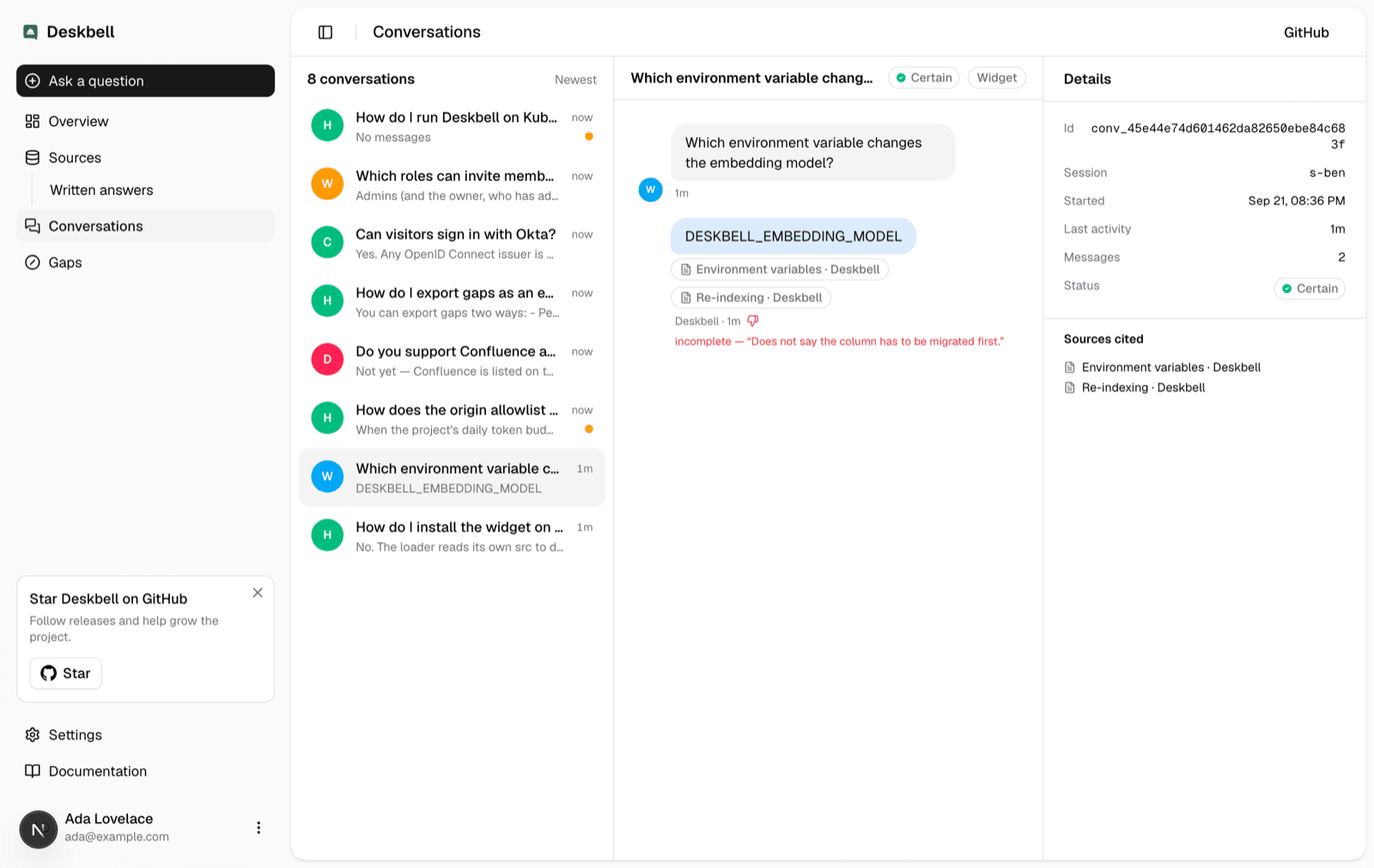
The inbox
Each row shows the thread's title, a preview of the last message, when it was last active, and a marker when the thread contains an uncertain answer: a refusal, or an answer whose best retrieved match scored under the weak floor. The rule is the one the Overview explains.
Three views sit above the list, each with its count: All, Uncertain,
and Downvoted (threads with an answer a visitor marked down). The view is
part of the address (/conversations?filter=down), so it can be bookmarked or
shared, and it stays selected while you move between threads.
A period control sits beside the count: All time, Today, Last 7
days, Last 30 days, Last 90 days, or a custom range of two dates.
Days are UTC calendar days, the same buckets the Overview chart draws, and a
relative period is the last so many days ending today. A preset is part of
the address too (/conversations?period=7d), and a custom range is its two
days (/conversations?from=2026-09-01&to=2026-09-23). Clicking a column of
the Overview chart opens the page on that one day. The three filter counts
are for the period; the list shows up to two hundred of its most recently
active threads.
A title is the first question trimmed to eighty characters, or one short
chat-model call per conversation when DESKBELL_THREAD_TITLES=model. A visitor
can rename their own threads from the widget's sidebar; the dashboard shows the
name they chose.
The thread
The transcript alternates the visitor's messages and the assistant's answers, rendered with the same Markdown the widget shows. Under each answer:
- Sources. A pill per cited page, linking to it. A cited written answer shows a pen glyph and no link.
- A refusal, named. The assistant refused, and the badge says why: Nothing retrieved when no page matched at all, No grounded answer when pages matched but did not support an answer, Off topic, or Blocked by guardrail. Hovering the badge shows how many chunks were retrieved and the best score. The first two are what the Gaps page clusters.
- Weak grounding. The answer was given, but from a best match under the weak floor. The same hover shows the retrieval behind it.
- Asked to clarify. The docs answer the question in more than one way and the visitor was asked which they meant.
- The footer line. When the answer was written, how long the model took, and which model wrote it. When the answer belongs to a gap cluster, an Open in Gaps link goes to that cluster.
- Feedback. A thumbs-up or thumbs-down, and for a thumbs-down the reason the visitor picked and any comment they typed. The built-in reasons read as sentences; a reason the page configured itself (feedback reasons) shows its id, since only the page knows its label.
The badge at the top of the thread summarises it: Certain, Uncertain
with a note such as 1 of 4 refused · 1 weak, or Unanswered when the
thread has no assistant message.
Details
The panel beside the transcript shows the thread's id, when it started, the session it belongs to, and the pages cited across the whole thread. A thread the visitor deleted from the widget stays readable here and says when it was deleted.
When the project verifies visitor identity, the panel shows the signed-in visitor by name, email or subject, and the thread belongs to that visitor across browsers. When the page passes context, each key appears as a row: which account, which site, which whatever your page named, with the id and the display name the page supplied.
What is stored
A conversation holds its messages, each answer's citations, the retrieval signal behind it (how many chunks matched and the best score), the refusal reason, feedback, and the context the page supplied when the thread started. Visitor IP addresses are never stored; rate limiting keeps only an HMAC hash. Security covers what leaves the instance, which is nothing except the calls to your model provider.
Conversations are kept until the project's retention window removes them. Data retention sets the window in days, counted from the last message; the hourly job removes older conversations with everything listed above.
Overview
The dashboard surfaces you use once the widget is live, what the Overview page counts, how an answer comes to be called uncertain, and where each signal leads.
Gaps
The Gaps page lists the questions your content could not answer, grouped by meaning, with what the assistant found, how the need is trending, and what to write next.