Actions log
Every tool call the project made, newest first, with the visitor's question, the arguments, the result and how it ended; filter by period, status, server and tool; download as CSV.
The Log tab under Actions lists every call a tool made on a visitor's behalf. It reads the same audit table the transcript reads, across all conversations, so "which tool fails", "what did the visitor confirm" and "why is this tool slow" each have a page.
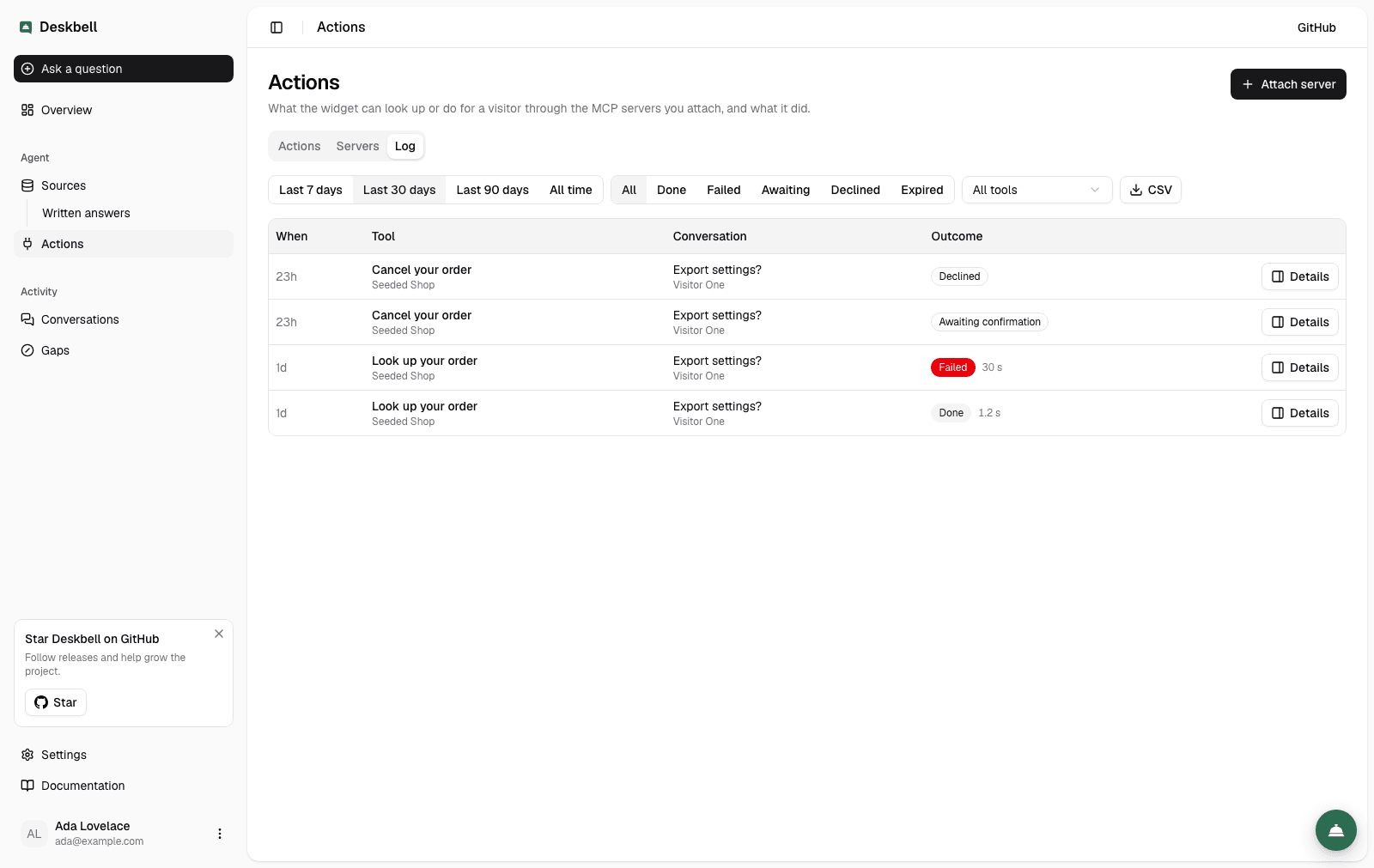
The list
One row per call, newest first: when, the tool's label and its server, the question that led to the call with a link to the conversation and the visitor's name when there is one, and the outcome — a status and the time the call took.
| Status | Meaning |
|---|---|
| Done | The tool ran and returned |
| Failed | The tool threw, timed out or the server was unreachable; the error is on the record |
| Awaiting confirmation | The visitor has a card and has not answered yet |
| Confirmed | The visitor confirmed; the run that followed is recorded on the same row |
| Declined | The visitor cancelled; nothing ran |
| Expired | Nobody answered within the confirmation window; nothing ran |
The list is capped at the latest two hundred calls. Narrow the period, or download the CSV, for more.
Filters
Period (7, 30, 90 days, all time), status, server and tool. All four are in the URL, so a view is a link you can send to a colleague. A tool filter applies within its server; choosing a different server drops a tool that does not belong to it.
The record
Details opens a call in a drawer: server and tool, visitor, when it was asked and answered, the arguments as the confirmation card listed them (or the raw input for a tool that needed no confirmation), the result as the server returned it — cut to the stored limit when it was long, and the page says so — and the error when it failed. A link opens the conversation; the server's name opens the tool's row in settings.
A call's record is also one click from the conversation transcript: the outcome on a call row under an answer opens it.
CSV
The CSV button downloads the current view with these columns:
id, created_at, server, tool, title, status, latency_ms, conversation_id, message_id, visitor_id, input, output, output_truncated, error, responded_at
input and output are JSON in a cell. A cell that starts with a formula
character is quoted so a spreadsheet does not evaluate it.
What is not here
- Retention: rows are kept until the conversation is deleted, which removes them with it.
- Re-running a call. The log records; the widget acts.
Confirmation
A tool set to needs-confirmation pauses the turn until the visitor confirms a card in the widget; the request is signed, expires after ten minutes and is recorded either way.
Visitor identity
A server learns who is asking either from an ES256 JWT this instance signs (signed token) or from the visitor's own access token, exchanged for one addressed to the server (visitor's own token); anonymous visitors get none of its tools either way.