Gaps
The Gaps page lists the questions your content could not answer, grouped by meaning, with what the assistant found, how the need is trending, and what to write next.
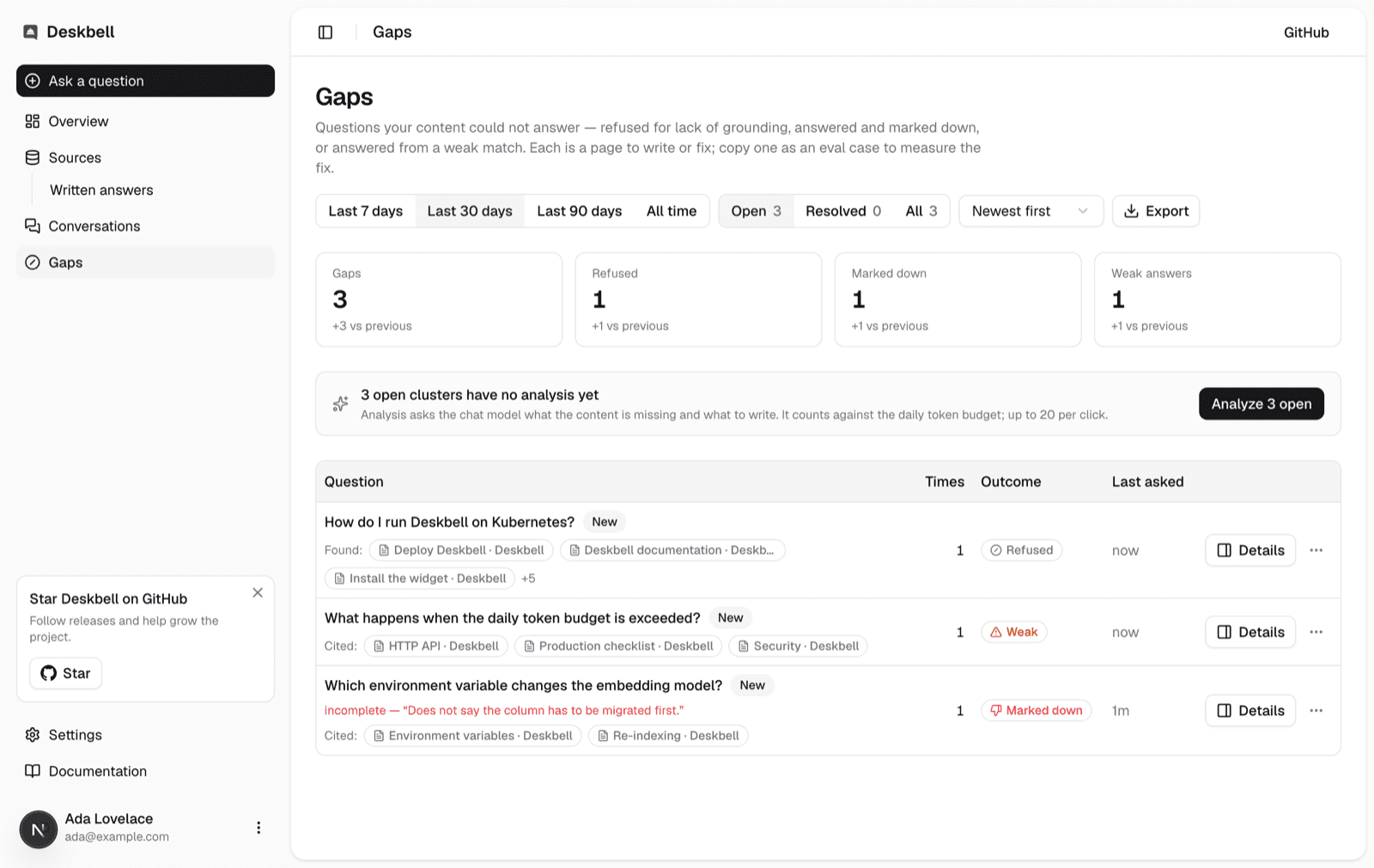
The Gaps page in the dashboard is the list of questions your content could not answer. Each row is a need, not a phrasing: "how do I set up SSO", "sso setup" and "configure single sign-on" are one row with a count of three. Rows carry what the assistant found or cited, with a cited written answer marked as one, how often the need came up and whether it is rising, and, on request, a written finding and recommendation. Details opens a drawer with all of it and the actions for the row. Every row can become an eval case, and the whole view downloads as a spreadsheet or a dataset.
What counts as a gap
Three signals make an answer a gap. Two come from the visitor and one from the engine.
| Signal | What happened |
|---|---|
| Refused | The assistant declined to answer. no context means retrieval returned nothing relevant; no grounding means it returned passages and the model would not answer from them |
| Marked down | A visitor gave the answer a thumbs-down, with a reason and an optional comment. This one can also notify a channel as it happens |
| Weak answer | The assistant answered, but its best retrieved passage scored under DESKBELL_GAPS_WEAK_SCORE |
Answers written before the engine started recording its evidence count only on the first two signals: a missing score never flags a row.
A clarifying question is none of the three. It is not a refusal, and the weak-answer floor is a property of an answer, so asking the visitor which reading they meant neither flags a row nor moves the weak count. A thumbs-down on one still counts, and so does whatever the answer after the visitor's pick turns out to be.
The row also says when an answer cited everything the engine retrieved because the model named no source. That is counted and shown, not treated as a gap: on the shipped chat model it is the common case, and it points at generation rather than at your content.
How rows are grouped
A worker job assigns each gap to a cluster. An exact repeat of an earlier
question joins its cluster without any model call. A new wording is embedded
with the configured embedding model and compared with every wording the project
has already seen — not just the phrasing each cluster is labelled with — so a
cluster keeps taking in paraphrases of the questions it already holds. It joins
the cluster of the closest wording when the similarity reaches
DESKBELL_GAPS_CLUSTER_SIMILARITY; otherwise it starts a cluster, labelled with
that first wording.
Before a question is embedded, the terms in Settings → Gaps are removed from it. Your own name appears in most of the questions people ask and tells none of them apart: left in, it pulls unrelated questions together, and two of them can end up as one row. Stripping it applies to the comparison only — the question you read keeps every word. By default the term is your workspace's name; the setting takes any list, and an empty list strips nothing.
The threshold is a property of the embedding model, and both it and the ignored terms only affect questions asked after the change. To group the questions you already have the same way, use Regroup existing questions in Settings → Gaps, which rebuilds every cluster in the project from the questions — and drops the clusters you marked resolved, because rebuilt groups are a different set.
If the embedding provider is unavailable, questions still land in a cluster by their text and an hourly catch-up job fills in the vectors and anything the per-message assignment missed. Until the worker has run, the page groups by exact wording and says so.
Period, trend and order
The page shows the last 30 days by default; 7 days, 90 days and all time are a click away and live in the URL, so a view is a link. The totals above the table compare the period with the equal-length period before it, and each row carries a trend: New when the need was not seen in the previous period, Up or Down when its count moved by a quarter or more.
The default order weights every occurrence by its age, halving every seven days, so a question refused for the first time today sits above a pair of refusals from three weeks ago while a burst from yesterday still outranks both. Most asked orders by count; Trending by the rise against the previous period.
The page shows open clusters by default: it is the list of things to do. The status control beside the period switches to Resolved, the clusters marked resolved or answered in the period, or All, where resolved clusters sit at the bottom of any order. Each choice shows its count, and the status is part of the URL like the period and the order. The totals and their deltas follow the view: on the resolved view they count resolved clusters in this period against resolved clusters in the one before.
Resolving a gap
Mark resolved records that the content now answers the need. The row leaves the open view and the Resolved view lists it; a gap closed by a written answer is listed there as Answered. If the question comes up again after that, the cluster reopens by itself, returns to the open view and shows Recurring: the fix did not hold, or a visitor found a phrasing it does not cover. Reopen is one click too.
Write an answer closes the gap from inside the dashboard. The row's drawer and its menu open a form with the question filled in; the answer is saved as a written answer, indexed like a page, and the cluster is marked Answered with a link to it. An answer that fails to carry the next occurrence reopens the cluster like any other fix, and the drawer then offers to edit it.
Draft with AI, on the answer field, fills it from the cluster's own material: the questions visitors asked, the passages the assistant retrieved, and the analysis if it has run. It is deliberately unwilling to guess. A gap is a question your content could not answer, so the passages usually do not hold the answer, and a draft that read fluently from them would be inventing — an invented answer, once indexed, is cited and looks authoritative. Instead the draft writes what the passages state and leaves a blank in square brackets wherever a fact is missing, naming what is needed, and lists those blanks under the field. You fill the blanks rather than compose the answer. On a cluster whose pages did cover the question, where retrieval or grounding was what failed, it comes back with no blanks at all.
A draft never destroys what you had: Undo draft restores it. Drafting
spends tokens against the same daily budget as analysis, and is refused
with a visible message when the budget is gone.
DESKBELL_ANSWER_DRAFTER_MODEL picks a different model for drafting than
the one answering visitors.
The drawer is part of the URL: /gaps?gap=<cluster> opens it, and
&write=1 opens it on the form, so a gap can be sent as a link and browser
back closes it. Its actions stay in a footer at the bottom of the drawer.
Analysis
Analyze asks the configured chat model to read a cluster, its phrasings and the passages the assistant had, and write a title, a finding (what visitors wanted and why the passages did not answer it), a recommendation (what to write or change, concretely) and up to five draft marking criteria. The result stays on the cluster; the row shows the title and recommendation, and the drawer shows all of it, with Analyze or Re-analyze beside its heading.
Analysis is a deliberate spend. It runs in the worker, counts against the
project's daily token budget, is refused with a visible message when the
budget is spent, and is skipped when nothing about the cluster changed since
the last run. Editors trigger it per cluster or with Analyze N open, which
sends the open, unanalysed clusters in the current view, up to twenty per
click. The bar above the table confirms the click at once, shows how many of
the clusters are done while the worker runs, and says when the findings are
ready; a request the worker has not answered in fifteen minutes is treated as
lost and can be sent again. Setting DESKBELL_GAPS_AUTO_ANALYZE_AT to a number of
occurrences analyses a cluster once, automatically, when it reaches that many
in 30 days; it is off by default because automatic spend is something you turn
on. DESKBELL_GAP_ANALYST_MODEL picks a different model for analysis than the
one answering visitors.
Everything the model reads is treated as material, not instructions, and everything it writes is shown as plain text.
From a gap to a coding agent
Copy prompt for your coding agent, in the drawer under the analysis and in the row's menu, puts the gap on the clipboard as a Markdown brief that a coding agent, a colleague or an issue can work from without asking anything back: the questions as visitors typed them, the pages the assistant had with their URLs, the finding and recommendation, the draft criteria as a checklist of what the content must state, the steps to make and verify the change with a link back to the gap, and the eval case. Paste it into an agent session opened on the documentation checkout and the agent has what it needs to find the page, change it and say when it is done. Without analysis the brief still carries the questions, the pages and the steps, and says that analysis has not run.
Everything a visitor typed is quoted in the brief, and the brief says so at the top, because the agent reading it may have write access to a repository: a question typed into the widget is material for it to read, not an instruction for it to follow.
Prompts for your coding agent in the Export menu downloads the same brief for every cluster in the current view as one file, which pairs with Analyze N open: analyse the view, download it, and hand an agent the lot.
From a gap to a measured fix
Copy as eval case, in the row's menu and in the drawer's, puts a case on the clipboard in the format the eval harness loads: the question, a placeholder marking criterion you replace with the real one (or the analysis's draft criteria, marked as suggested), an empty list of relevant pages, and the provenance of the message it came from. Paste it into your dataset, write the criteria, add the page that answers it, and the next eval run measures whether the fix worked.
Export downloads the current view. The CSV has one row per cluster with the counts, trend, dates, downvote reasons, sample phrasings, evidence documents, the latest conversation and the analysis, for a spreadsheet or an issue tracker; questions that start with a formula character are escaped. The dataset is one answerable case per cluster in the harness's own format:
pnpm evals --dataset ~/Downloads/deskbell-gaps-my-project-30d-2026-09-10.json \
  --project proj_x --retrieval-only
It loads as downloaded and grades visibly wrong until someone writes the criteria, which is the point: a person decides what a correct answer contains.
Settings
| Variable | Default | What it does |
|---|---|---|
DESKBELL_GAPS_WEAK_SCORE | 0.35 | Top retrieval score under which an answered question is a weak answer |
DESKBELL_GAPS_CLUSTER_SIMILARITY | 0.80 | Similarity at which a new wording joins the cluster of the closest wording |
DESKBELL_GAPS_AUTO_ANALYZE_AT | 0 (off) | Occurrences in 30 days at which a cluster without an analysis is analysed automatically |
DESKBELL_GAP_ANALYST_MODEL | The chat model | The model that writes analyses |
DESKBELL_GAP_ANALYST_TIMEOUT_MS | 30000 | Past it an analysis fails and the cluster shows the error |
DESKBELL_ANSWER_DRAFTER_MODEL | The chat model | The model that drafts written answers |
DESKBELL_ANSWER_DRAFTER_TIMEOUT_MS | 30000 | Past it a draft fails and the form says so |
The two thresholds were measured on openai/text-embedding-3-small. A
different embedding model moves both scales; the
configuration reference says how to re-measure.
Terms to ignore are per project and live in the dashboard, not in the environment: Settings → Gaps.
Limits
- Clusters form incrementally in the order questions arrive. Two worker replicas racing on two phrasings of one new need can create two clusters; the next re-cluster merges them.
- The similarity threshold was chosen on a small set of pairs. Expect to move it once a real project has traffic, and expect a strict threshold to show one need as two rows rather than hide a question inside another.
- Analysis is only as good as the passages the engine had. A cluster whose retrieval found nothing gets a finding that says so.
- The page is not paginated. A project with thousands of gaps in a period will need the period narrowed; the status filter is the other lever, since the default view leaves out everything already resolved.
Conversations
The dashboard's conversation inbox and thread view, what the uncertain marker means, how feedback and reasons appear, and what a verified visitor's thread shows about who and where.
Notifications
Send a Slack message or a signed webhook when a visitor marks an answer down, with the question, the reason, the host context and a one-sentence summary.